Clarify 2.0 product level and access on client page
1
votes
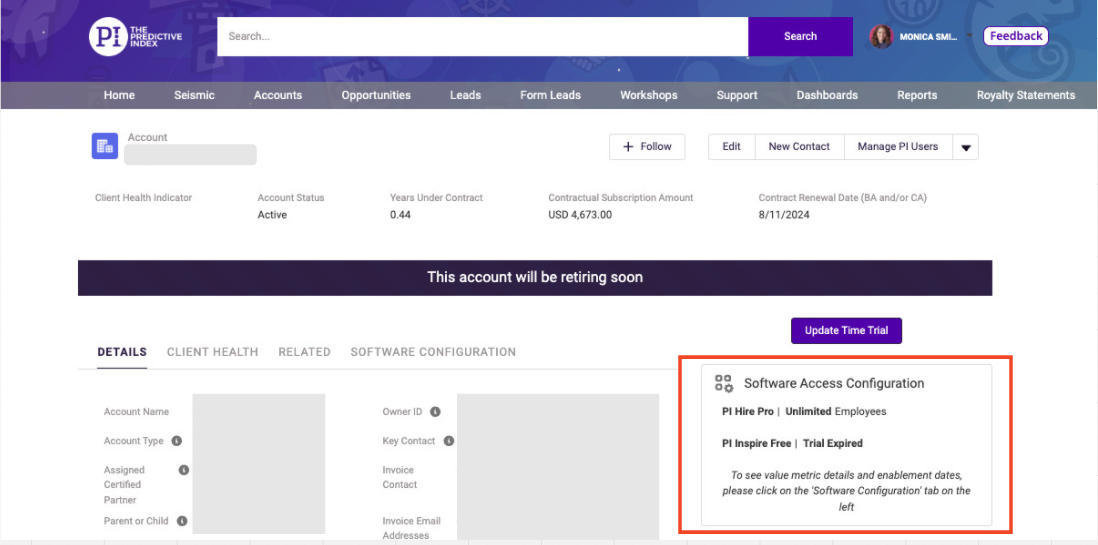
In speaking to User Ops, there's currently not a differentiation between a client who has 2.0 unlimited vs 2.0 with a metered amount of activated candidates. The only way to determine this information is to go to the contract, which a bit cumbersome. It would be great to be able to see somewhere on the client page how the client is set up - ideally within the software configuration section.
Done
Partner Platform + Interface
Suggested by:
Curtis Creekmore
•
Upvoted: 02 Nov, '23
•
Comments: 1
Comments: 1
Oldest
•
Newest
•
Most likes
•
Fewest likes
-
09 Jan, '25
Mamie Cox Admin PinnedHappy to confirm that this visibility exists today on any account page in ForceBC. Purchased or trial modules along with exact value metrics can be seen in the 'Software Configuration' window -- see screenshot attached for example.
 gn9qtybs6kziwzosk4sx.png